
How CDNs Speed Up Your Website
Understanding the Need for Speed
In today’s digital landscape, website speed isn’t just a luxury—it’s a necessity. Users expect near-instantaneous page loads, and search engines like Google factor loading speed into their ranking algorithms. A delay of even a few seconds can significantly increase bounce rates and decrease conversions:
- 40% of visitors abandon websites that take more than 3 seconds to load
- Each second of delay reduces customer satisfaction by 16%
- A 1-second delay in page response can result in a 7% reduction in conversions
This is where Content Delivery Networks (CDNs) come in as a game-changing solution.
What Is a CDN?
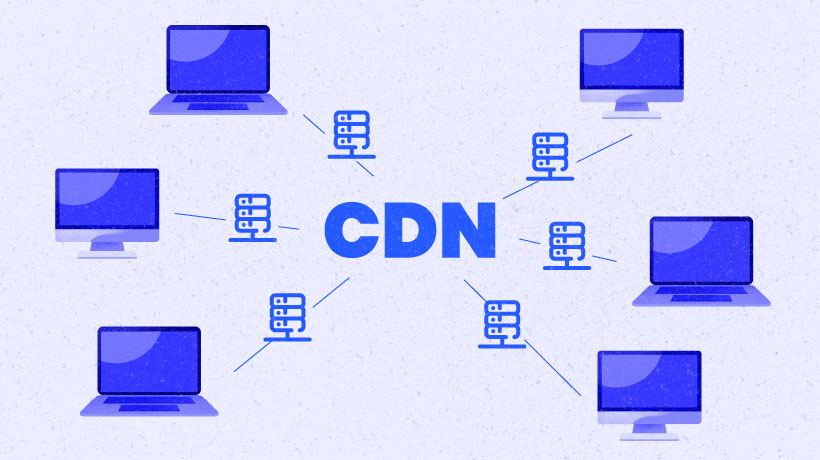
A Content Delivery Network is a distributed system of servers strategically positioned in multiple geographic locations around the world. These networks are designed to deliver web content to users based on:
- Their geographic location
- The origin of the webpage
- The content delivery server’s location
Instead of all user requests traveling to your website’s origin server, a CDN serves cached versions of your content from servers (called “edge servers” or “points of presence”) that are physically closer to your users.
How CDNs Work: The Technical Breakdown
1. Geographic Distribution
When a user accesses your website, their request is routed to the nearest CDN edge server rather than your origin server, which might be thousands of miles away.
User Request → DNS Resolution → Nearest CDN Edge Server → Cached Content Delivery
2. Caching Mechanisms
CDNs employ sophisticated caching strategies:
- Static caching: Stores unchanging files like images, CSS, and JavaScript
- Dynamic caching: Intelligently caches changing content based on rules
- Object caching: Stores database queries and API responses
- Edge computing: Executes code at network edges to customize content delivery
3. Request Handling
If (requested content is cached AND cache is fresh)
    Deliver cached content directly
Else
    Fetch from origin server
    Cache for future requests
    Deliver to user
Key Benefits of Using a CDN
Dramatic Speed Improvements
CDNs can reduce page load times by 50-70% by:
- Reducing network latency: Physical proximity means fewer network hops
- Optimizing TCP connections: CDNs maintain persistent connections
- Implementing HTTP/2 and HTTP/3: Modern protocols improve multiplexing and parallelization
- Using TLS session resumption: Reduces SSL/TLS handshake overhead
Enhanced Reliability and Availability
- Traffic distribution: CDNs spread request loads across multiple servers
- Redundancy: If one edge server fails, traffic automatically routes to others
- DDoS protection: Many CDNs include built-in security to absorb attack traffic
- Hardware failure isolation: Server issues are contained without affecting your entire site
Global Reach and Scalability
CDNs excel at delivering content to international audiences:
- Global infrastructure: Top CDNs have thousands of servers worldwide
- Automatic scaling: Handle traffic spikes without manual intervention
- Regional optimization: Adapt content delivery based on local conditions
- Mobile network optimization: Special protocols for cellular networks
Real-World Impact: Case Studies
E-commerce Giant Improves Conversion Rate
A major online retailer implemented a CDN and saw:
- 32% reduction in page load time
- 15% increase in conversion rate
- 23% decrease in cart abandonment
Media Site Handles Traffic Surge
A news website using a CDN successfully managed a 500% traffic increase during a breaking story:
- Maintained 99.99% uptime
- Average page load remained under 1.8 seconds
- Successfully served 4.3 million concurrent visitors
How to Implement a CDN for Your Website
Step 1: Choose the Right CDN Provider
Compare these popular options:
| CDN Provider | Best For | Key Features |
|---|---|---|
| Cloudflare | Budget-conscious sites | Free tier, security focus, easy setup |
| Akamai | Enterprise applications | Global reach, advanced features, high reliability |
| Amazon CloudFront | AWS users | Integration with AWS services, pay-as-you-go pricing |
| Fastly | Developer flexibility | Programmable edge, real-time purging, API-first |
| Bunny CDN | Cost-efficiency | Simple pricing, high performance/cost ratio |
Step 2: Configure Your Website
For most websites, implementation involves:
- Sign up with your chosen CDN provider
- Add your domain to the CDN dashboard
- Update DNS settings to point to the CDN
- Configure caching rules based on content types:
# Example cache-control headers
Cache-Control: max-age=31536000, immutable  # For versioned static assets
Cache-Control: max-age=3600  # For HTML pages
Cache-Control: no-cache  # For personalized content
Step 3: Optimize for Maximum Benefit
- Enable compression (Brotli or Gzip)
- Implement image optimization (WebP, responsive images)
- Configure preloading and prefetching
- Utilize HTTP/2 or HTTP/3 when available
- Set up proper cache invalidation methods
Advanced CDN Techniques
Edge Computing and Serverless Functions
Modern CDNs now offer edge computing capabilities, allowing you to:
- Execute JavaScript at the edge
- Personalize content without origin requests
- Implement A/B testing at the network edge
- Process authentication and authorization locally
Example Cloudflare Worker (JavaScript at the edge):
addEventListener('fetch', event => {
  event.respondWith(handleRequest(event.request))
})

async function handleRequest(request) {
  // Customize content based on user location
  const userCountry = request.headers.get('CF-IPCountry')

  // Fetch cached content
  let response = await fetch(request)

  // Modify response based on user location
  const body = await response.text()
  const modified = body.replace(
    '',
    userCountry === 'FR' ? 'Bonjour' : 'Hello'
  )

  // Return modified response
  return new Response(modified, {
    headers: response.headers
  })
}
Video Streaming Optimization
CDNs offer specialized solutions for video:
- Adaptive bitrate streaming: Adjusts quality based on connection
- Multi-format transcoding: Handles different device requirements
- Video-specific caching: Optimizes for partial content requests
- Live streaming support: Reduces latency for real-time content
Measuring CDN Performance
Key Metrics to Track
After implementing a CDN, monitor these metrics:
- Time to First Byte (TTFB): How quickly the first byte of data reaches users
- Content Download Time: How fast the full content downloads
- Cache Hit Ratio: Percentage of requests served from cache
- Error Rates: Frequency of 4xx and 5xx errors
- Global Performance Variations: Speed differences by geographic region
Monitoring Tools
- Google PageSpeed Insights: Free performance analysis
- WebPageTest: Detailed waterfall charts from multiple locations
- Pingdom: Continuous uptime and performance monitoring
- New Relic: Application performance monitoring with CDN insights
- CDN provider dashboards: Built-in analytics and reporting
Common CDN Challenges and Solutions
Challenge: Cache Invalidation
Problem: Serving outdated content after updates
Solution: Implement versioned asset URLs and proper purge strategies:
# Instead of:
<script src="/js/main.js"></script>

# Use:
<script src="/js/main.js?v=1.2.3"></script>
# or
<script src="/js/main.1.2.3.js"></script>
Challenge: HTTPS Configuration
Problem: Mixed content warnings or certificate issues
Solution:
- Use CDN-provided SSL certificates
- Enable HTTPS redirection
- Update internal links to use HTTPS
Challenge: Origin Shield Protection
Problem: Traffic spikes still impact origin server
Solution: Implement origin shielding to consolidate requests:
User Requests → Multiple Edge Servers → Single Shield Server → Origin Server
Cost-Benefit Analysis: Is a CDN Worth It?
Typical Cost Factors
- Bandwidth usage: Most CDNs charge per GB transferred
- Request volume: Some charge per 10,000 requests
- Geographic reach: Premium for certain regions
- Advanced features: Additional costs for security, analytics
ROI Considerations
For most websites, CDNs provide clear ROI through:
- Reduced server costs: Lower origin traffic means smaller server requirements
- Increased conversions: Faster sites convert better
- Lower bounce rates: Visitors stay longer on faster sites
- Better SEO rankings: Speed is a ranking factor
- Reduced support costs: Fewer performance-related complaints
Future of CDNs
The CDN landscape continues to evolve with:
- Edge AI: Machine learning deployed at network edges
- IoT optimization: Specialized edge nodes for device communication
- Web3 content delivery: Distributed storage integration
- Environmental considerations: Green computing initiatives
- Quantum computing preparation: New security and distribution algorithms
Conclusion
Implementing a CDN is one of the most effective ways to improve website performance, reliability, and user experience. Whether you run a small blog or an enterprise application, modern CDNs offer solutions that scale with your needs.
By distributing content closer to your users, optimizing delivery, and providing additional security benefits, CDNs deliver substantial improvements that directly impact business metrics.
As web performance expectations continue to rise, CDNs aren’t just an optimization—they’re becoming a fundamental component of successful web architecture.
Additional Resources
- Web.dev’s Guide to Content Delivery Networks
- MDN Web Docs: HTTP Caching
- CloudFlare Learning Center
- CDN Planet: CDN Comparison
Have you implemented a CDN for your website? Share your experience and results in the comments below!